
3D Modeling for HVAC: Commercial Project Guide 2026
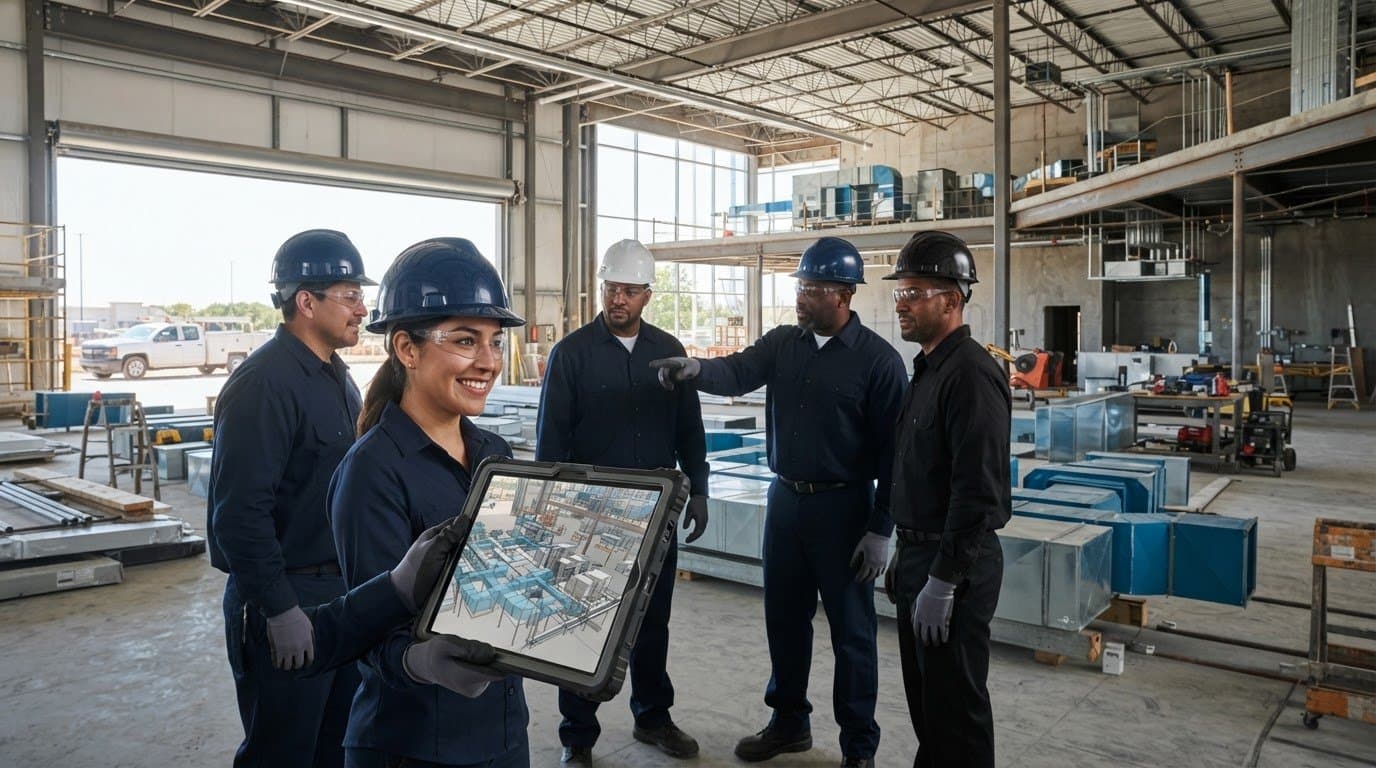
What makes 3d modeling for hvac systems useful on a commercial project is not how detailed the model looks, but whether it gives the people coordinating, fabricating, and installing the system information they can act on. A model can help teams review HVAC routes and interfaces alongside structure and other building systems, but its value depends on the project scope and how the information supports decisions, not on visualization alone.
On a Texas commercial project, coordinated modeling can help teams examine HVAC routes before installation and identify areas that need review. It does not eliminate clashes or field risk. J3 Mechanical Services uses Building Information Modeling (BIM) and in-house fabrication to support commercial HVAC installation and new construction, connecting digital coordination with component preparation and field execution. This guide explains what an HVAC 3D model can and cannot show, how model types and deliverables relate to project needs, and how to assess whether coordination information carries through to fabrication and installation planning.
Key Takeaways
- Understand what 3d modeling for hvac systems represents on a commercial project, and why a visual model alone may not meet coordination needs.
- See how project inputs and constraints inform model development, review, and coordinated outputs.
- Compare generic HVAC components with project-specific models to determine which supports the intended use.
- Assess modeling scope by clarifying its purpose, inputs, coordination participants, and deliverables, while accounting for project-specific Texas requirements.
- Learn how BIM and in-house fabrication connect project coordination with commercial HVAC installation, replacement, and new construction planning.
What 3D Modeling for HVAC Systems Means on a Texas Commercial Project
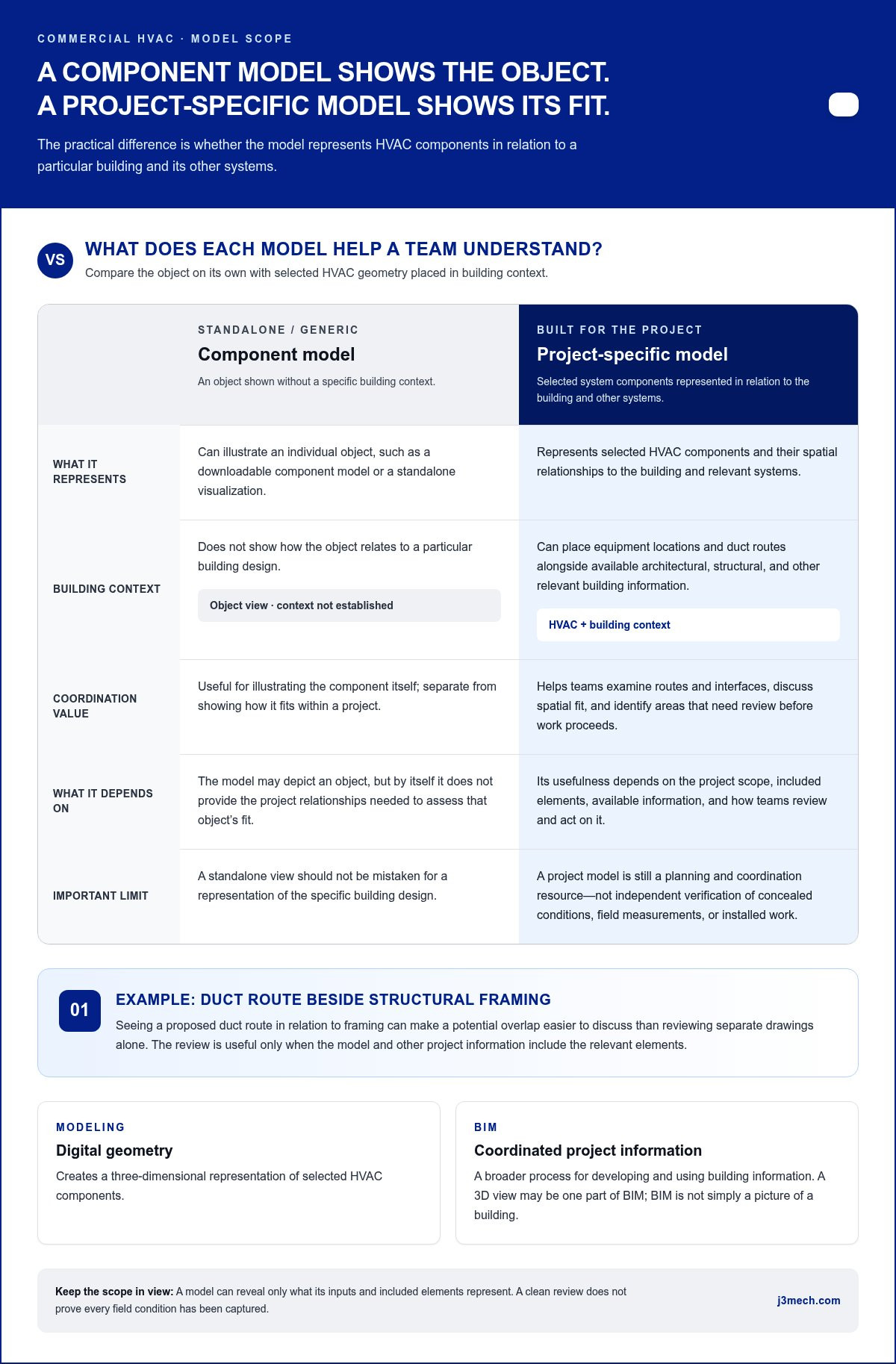
An HVAC 3D model is project-specific digital geometry that represents selected system components and their spatial relationships to the building and other systems. On a commercial project, its practical value comes from showing how the modeled HVAC scope fits the building context, rather than simply displaying an attractive three-dimensional image. A standalone visualization or downloadable component model can illustrate an object, but it does not show how that object relates to a particular building design.
A model can help project participants examine equipment locations and duct routes alongside available building information, identify areas that need review, and discuss coordination before work proceeds. It does not automatically validate the HVAC design, confirm site conditions, or eliminate clashes. Its usefulness depends on what it includes, what it is intended to support, and how teams review and act on the information.
What information does a commercial HVAC model represent?
Depending on the project scope, an HVAC model may represent ductwork, equipment, and relevant connections. Their modeled locations, dimensions, and relationships help teams assess spatial fit. For example, viewing a proposed duct route in relation to structural framing can make a potential overlap easier to discuss than reviewing separate drawings alone. That review is useful only if the model and other project information include the relevant elements.
A model is not the building itself. Its geometry reflects the information used to create or update it. It does not independently verify concealed conditions, field measurements, or final installed work. Treat it as a planning and coordination resource, and understand that its scope and inputs determine what it can show. The general concept of creating and representing three-dimensional forms is explained in What is 3D Modeling?
How does 3D modeling relate to BIM?
3D modeling describes the creation of digital geometry. Building Information Modeling, or BIM, is broader: it is a coordinated, information-based process for developing and using building project information. A three-dimensional view may be one part of BIM, but BIM is not simply a picture of a building. Its project value depends on how relevant information is organized, shared, and used by participating teams.
HVAC modeling can contribute mechanical system information to a wider building model, where it can be reviewed in relation to structural and other relevant systems. Project conditions and requirements vary across Texas, so the model scope should reflect the specific project rather than assume one regional template fits every site. J3 Mechanical Services uses advanced BIM alongside in-house fabrication, connecting digital project coordination with commercial HVAC execution. These capabilities complement each other, while the model remains a planning resource, not a guarantee of field conditions or outcomes.
How HVAC 3D Modeling Moves from Project Inputs to Coordination
Useful 3d modeling for hvac systems follows a clear sequence: establish the project information and intended scope, develop the HVAC geometry, then review it against the relevant building context. The model’s coordination value depends on the suitability of its inputs, whether changes are incorporated, and whether participating teams review the information in time to inform decisions. Modeling is a managed project process, not simply a drawing converted into three dimensions.
What project inputs shape the HVAC model?
Available HVAC design drawings, equipment information, and architectural or structural context help define what can be represented and compared. Project phase and agreed scope also shape the level of model detail. Early planning may focus on system routes and major equipment, while a later phase may require more specific geometry for coordination or fabrication planning. Missing, revised, or inconsistent inputs can limit what the model shows and may require updates as the project develops.
A practical workflow typically moves through these stages:
- Gather available information. Review relevant design documents, equipment details, and architectural and structural context. Note gaps or revisions that could affect the HVAC layout.
- Set the modeling scope. Define which HVAC components and areas the model will represent, the project phase it supports, and the intended uses of its outputs.
- Develop the HVAC geometry. Represent the scoped components in relation to the building context, using available project information as the basis for modeled locations and dimensions.
- Review system interfaces. Compare HVAC routes and equipment locations with structural elements and other relevant building systems. Treat a potential overlap as an issue for teams to examine, not an automatic instruction to change the design.
- Resolve comments and issue outputs. Record review feedback, incorporate agreed updates, and share coordinated information in forms suited to the project’s next planning or execution steps.
Clash detection flags modeled conflicts for review; it does not automatically resolve them. Teams may need to assess design intent, available space, and project constraints before agreeing on a response. A model can reveal only conflicts represented by its inputs and scope, so a clean review is not proof that every field condition has been captured. The U.S. Department of Energy’s overview of Building Energy Modeling for HVAC describes a related analytical discipline. Energy modeling and spatial coordination serve different purposes and should not be treated as interchangeable deliverables.
How does coordination inform fabrication planning?
When the project scope and model detail support it, coordinated ductwork information can help inform fabrication planning by giving teams a shared reference for the modeled layout. Communication between modeling, fabrication, and installation teams is important: each needs to review relevant updates and understand which information applies to its work. J3 Mechanical Services combines advanced BIM with in-house fabrication for commercial HVAC projects, connecting digital coordination with physical execution while keeping field review part of the process.
For commercial installation and new construction, clear coordination can help carry project information into the next phase. J3’s commercial HVAC BIM and fabrication capabilities bring those disciplines into the same project context, with scope suited to the work being planned.
Generic HVAC 3D Models vs. Project-Specific Models: What Commercial Teams Gain
A generic HVAC asset and a project-specific model can both look detailed on screen, but they serve different purposes. A downloadable component may help communicate what a type of equipment or duct fitting looks like. A commercial project model is developed in relation to a particular building’s design context and defined coordination needs. When deciding how to use 3d modeling for hvac systems, ask which information supports the next project decision, not which model looks more complete.
Comparison
Purpose
Generic model: Visualization, early discussion, or a general reference for an HVAC component.
Project-specific model: Representation of scoped HVAC elements in the context of a commercial project’s design information.
Project specificity
Generic model: Created without the building’s particular layouts, constraints, and system relationships.
Project-specific model: Shaped by available project inputs, defined scope, and the building context being coordinated.
Coordination value
Generic model: Can clarify appearance, but does not establish how a component fits with this project’s structure or other systems.
Project-specific model: Can support review of represented system interfaces and spatial relationships, subject to input quality and review.
Appropriate use
Generic model: Useful for communication or reference when exact building fit is not the decision at hand.
Project-specific model: Useful when teams need project-context information for coordination, planning, or defined execution needs.
When is a generic 3D model useful, and when is it not?
A generic asset can help an owner or project team discuss equipment appearance, illustrate a concept, or establish a visual reference early in planning. Its limits matter when teams need to assess a component against actual building constraints. Without adaptation to project information, generic geometry cannot represent verified building conditions or demonstrate coordination fit. Do not treat a marketplace model as construction-ready simply because it is detailed or downloadable.
Which model details matter for commercial coordination?
Useful detail is detail that serves the project’s defined needs. Teams may need to understand where HVAC elements interface with structure, how a route occupies available space, or whether modeled equipment relationships warrant further review. More geometry is not automatically better. Detail unrelated to a decision can add complexity without improving coordination. In commercial installation planning, model scope should align with the work teams must execute and the information they need to review.
A polished rendering alone does not prove coordination quality. It does not show whether the model reflects current project inputs, includes relevant interfaces, or has been reviewed against the appropriate building context. A practical assessment asks what the model represents, what information informed it, and which decisions it is intended to support. For Texas projects, evaluate the model against the specific building and project conditions rather than assuming a generic asset suits every site.
Project-specific models can support HVAC installation and replacement planning when their scope aligns with the intended work. Their value lies in relevant information and how teams use it, not visual complexity or the assumption that every condition has been captured.
How to Assess HVAC 3D Modeling Scope, Limits, and Texas Project Needs
Start by identifying the decisions a model is meant to support. For 3d modeling for hvac systems, a project team should decide whether the model is for early planning, system coordination, fabrication planning, installation planning, or a defined combination of uses. A clear purpose helps set appropriate expectations for detail and prevents teams from treating a visual representation as a complete record of every project condition.
What should teams define before modeling begins?
Before modeling begins, align the project phase with the HVAC elements to be represented, the available information sources, and the people responsible for review. Establish how feedback will be documented, design changes communicated, and updated information issued. These decisions make the model’s boundaries clear and help participants understand which questions it can inform and which require other project documents or verification.
- Intended use: Identify the decisions and project phase the model should support.
- Scope: Specify which HVAC areas, equipment, and connections are included, and which are outside the model’s purpose.
- Inputs: Identify the drawings, equipment information, and building context being used, including known gaps or revisions.
- Review roles: Establish which project participants review the model and how coordination comments are handled.
- Deliverables and updates: Agree on what information will be issued, when it will be revised, and how teams will identify current project information.
These criteria distinguish a model prepared for general visualization from one intended to inform coordination or fabrication planning. They also make limitations easier to identify early. If supplied drawings change, equipment information is incomplete, or project scope shifts, the model may need corresponding updates before teams use it for subsequent decisions.
How do Texas site and project requirements affect coordination?
Texas projects do not share identical job conditions. A commercial project in San Antonio may have different site constraints, design inputs, and review processes from one elsewhere in Central Texas or another Texas market. Establish which local project requirements and authority reviews apply to the specific site instead of assuming one regional approach covers every location.
Model coordination has limits. It reflects the information supplied and the scope represented, so it cannot independently confirm concealed conditions or replace field verification. Nor does a model replace the approved design or the project’s applicable review process. For example, a route shown against available structural information can support a spatial review, but it cannot confirm that the information captures every condition encountered during installation.
J3 Mechanical Services connects commercial HVAC modeling with fabrication and installation planning across Texas, tailoring coordination to the project rather than assuming identical requirements across the state. Discuss commercial HVAC BIM and project planning with J3 Mechanical Services.
How J3 Mechanical Connects HVAC Modeling with Commercial Execution
The practical value of 3d modeling for hvac systems is clearer when project information can support decisions beyond the screen. J3 Mechanical Services brings advanced Building Information Modeling (BIM) and in-house fabrication to its commercial HVAC work, connecting digital coordination with the physical preparation and installation of HVAC systems. These capabilities work together: modeling organizes project information for review, while fabrication and installation put project plans into practice.
How BIM and in-house fabrication work together
For a commercial project, coordinated HVAC information can inform fabrication planning when the model scope and project inputs suit that use. As information moves between coordination, fabrication, and installation, clear communication helps teams work from relevant project details and understand updates. BIM does not replace fabrication judgment or field review. It provides a shared project context that can help connect decisions across phases.
This approach applies to new construction as well as installation and replacement work, where project-specific constraints shape HVAC planning. J3 Mechanical Services' BIM and in-house fabrication capabilities support connected project work without assuming every model includes fabrication-level detail or captures every field condition. The project scope determines how the information is used.
What a commercial project team can do next
To prepare for a productive project discussion, organize the information that defines the work and the decisions modeling may need to support. A concise project brief can identify:
- Facility and location: The building type and whether the project is in San Antonio, Austin, Seguin, New Braunfels, Corpus Christi, or another Texas market.
- Project phase: Whether the work concerns new construction, installation, or replacement, and where planning currently stands.
- Coordination needs: The HVAC areas or interfaces that need attention and the project participants involved in review.
- Available information: Relevant drawings, equipment details, and known changes that may affect planning.
These details help define a project-specific modeling scope and how BIM may relate to fabrication and field execution. J3 Mechanical Services serves commercial HVAC projects in San Antonio, Selma, Seguin, Austin, Corpus Christi, Killeen, Joshua, Bandera, Boerne, New Braunfels, Edinburg, McAllen, the Rio Grande Valley, Rockport, Pleasanton, San Marcos, and Round Rock. Regional context matters, while project requirements and site conditions still need to be considered individually.
For commercial HVAC installation or new construction, discuss your commercial HVAC project with J3 Mechanical Services and outline the facility, project phase, and coordination needs shaping the work.
Set the Project Up for a Coordinated Next Step
Before modeling begins, decide which project decisions need clearer information and who will use that information next. A focused scope gives 3d modeling for hvac systems a practical role in commercial planning, whether the priority is coordinating a new build or preparing for installation or replacement. Bring the facility context, project phase, and known coordination questions into the discussion so the modeling effort supports real execution needs.
J3 Mechanical Services combines advanced BIM with in-house fabrication and provides commercial HVAC installation, replacement, and new-construction services across Texas. That combination connects digital project information with the work it can inform, while keeping scope and field conditions central to planning.
Discuss your commercial HVAC project with J3 Mechanical and identify the coordination priorities shaping your next phase. Clear project questions are a sound starting point for deliberate planning and confident execution.
Frequently Asked Questions
Is 3D modeling required for a commercial HVAC project?
No, 3D modeling is not universally required for every commercial HVAC project. Whether it is expected depends on project documents and the applicable authority’s review, so establish the requirement during project planning rather than assuming it based on building type alone. J3 serves commercial projects in San Antonio, Selma, Seguin, Austin, Corpus Christi, Killeen, Joshua, Bandera, Boerne, New Braunfels, Edinburg, McAllen, the Rio Grande Valley, Rockport, Pleasanton, San Marcos, and Round Rock. Requirements remain specific to each location and project.
Can an HVAC 3D model show clashes with structural and electrical systems?
Yes. A model can help identify potential overlaps with structural or electrical elements when those systems are represented in compatible project information. For example, a modeled duct route may appear to intersect a beam or pass through space occupied by electrical equipment. Treat that result as a coordination item for the relevant teams to review. The model can reveal only issues represented by its geometry and current shared information.
What information is needed to create a 3D model for an HVAC system?
Inputs commonly include HVAC design drawings, equipment information, and architectural and structural plans relevant to the modeled area. For 3d modeling for hvac systems, teams should also define the intended project use and phase, since these determine which components need representation. Identify revised drawings, incomplete equipment details, or areas with limited existing-condition information so the team can account for those gaps during review.
How is HVAC 3D modeling different from BIM?
HVAC 3D modeling creates digital geometry for selected mechanical components, while Building Information Modeling (BIM) describes a broader process for developing and using coordinated building information. A model can be one part of BIM, but BIM also concerns how project information is organized and shared among participants. An HVAC model, for example, may be reviewed alongside other building systems as part of wider coordination rather than used only as a visual presentation.
Can a 3D model represent existing HVAC conditions in a renovation?
Yes, a model can represent existing HVAC conditions when available records or field information provide a basis for that representation. For renovation planning, teams can compare existing drawings with observations or measurements collected for the project, then note areas where records and observed conditions differ. The model reflects the information used to create it. It does not prove concealed conditions that have not been inspected or documented.
Does HVAC 3D modeling eliminate installation conflicts?
No, modeling cannot eliminate every installation conflict. It can help teams identify and discuss potential issues represented in project information, but actual conditions can differ from the model and project information can change. Field verification, communication, and review remain important as work proceeds. Use model findings to inform planning and coordination, not as confirmation that installation will be free of unexpected conditions.
How does HVAC 3D modeling support ductwork fabrication?
Coordinated ductwork information can help inform fabrication planning when the model’s scope and detail suit that purpose. It gives the project team a digital reference for discussing duct routes and relationships before fabrication decisions are made. J3 Mechanical Services combines BIM with in-house fabrication for commercial HVAC projects. Model information still needs appropriate review and communication between project, fabrication, and installation teams before it is used for physical work.
Need a hand with your building's HVAC?
Free quotes and honest answers from licensed commercial technicians across South Texas.